
Error 3511 indicates an issue with Angel API setup in APIBridge. If you want to trade in another Broker API, contact your admin.
To trade with Angel API using the APIBridge desktop application, follow the steps given below.
STEP 1: Log in to Angel Smart API Portal https://smartapi.angelbroking.com/
STEP 2: Click on “Create new App” if you are a first-time user. Provide the App name and a redirect URL. Then click on “Create APP”.
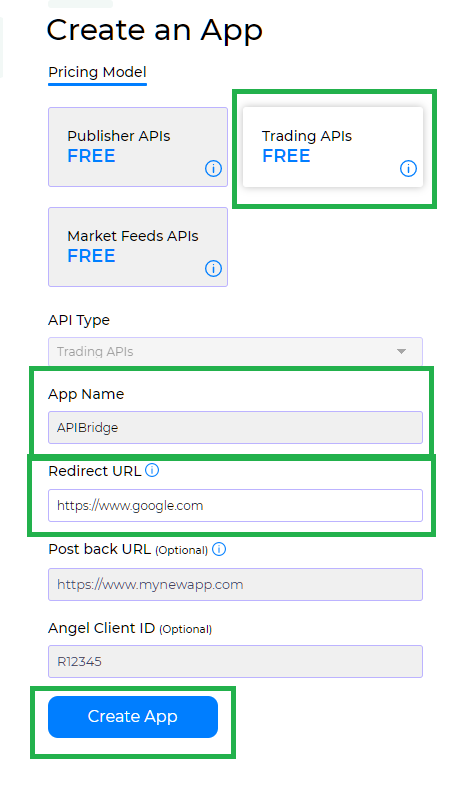
STEP 3: You will get an API Key and API Secret on the screen. Make sure the status is active.

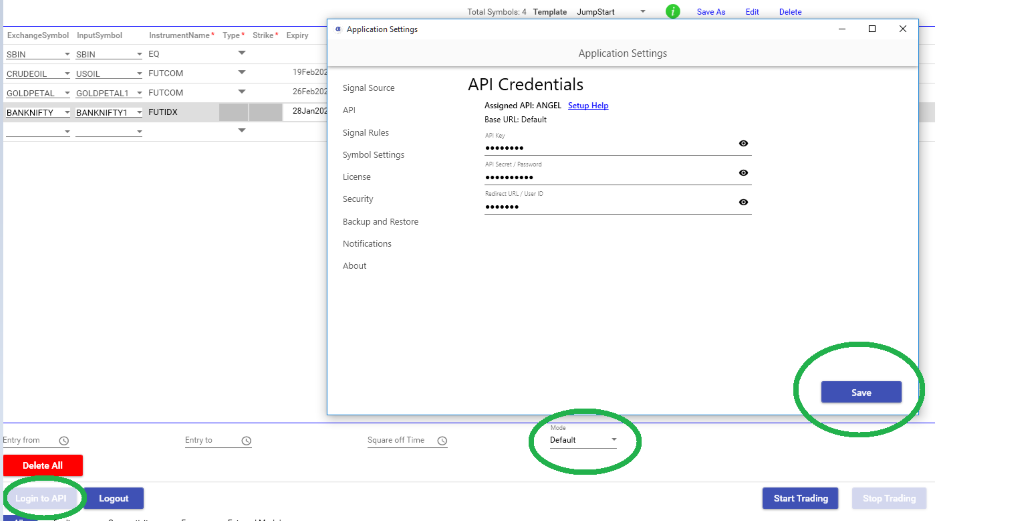
STEP 4: In APIBridge go to Application Settings->API. Put details below:
- API Key: API Key (We generated above)
- API Secret: Angel Trading Account MPIN
- User ID: Your broker (Angel) account ID
STEP 5: Save application settings. Keep mode Default and Login to API. If Credentials are correct, Bridge will display the message – Login successfully to API
| Feature | Details |
| Cost | Free |
| Auto Order Cancellation | YES |
| MaxProfit/MaxLoss | YES |
| SLL, SLM Orders | YES |
| CO | NO |
| BO | NO |
| Trail SL in BO | NO |
| MCX Futures | YES |
| NSE Currency | YES |
| NSE Weekly Options | YES |
Recent Discussion