
Error 3503 indicates issue with XTS API setup in APIBridge. If you want to trade in other Broker API, contact your admin.
XTS API is commonly used among multiple brokers. You can identify the broker assigned in your APIBridge license, by checking the base url.
| Broker Name | Base Url |
| Gill Broking | https://trade.gillbroking.com/ |
| Pure Broking | http://203.88.157.218:3000 |
| Nirmal Bang | http://xts.nirmalbang.com:3000/ |
| CompositEdge | http://xts.compositedge.com/ |
| SSCorporate | https://trade.sscorporate.com:3000 |
| IIFL | https://ttblaze.iifl.com |
| SMC | https://tradex.smcindiaonline.com/ |
| 5 Paisa | http://103.69.171.174:31021 |
XTS Credentials for Login via APIBridge
STEP 1: In APIBridge go to Application Settings->API. Put details as below:
API Key: Key provided by your broker (For Gill Broking, IIFL, and SMC, and 5 Paisa use 6 digit Pin)
Password: Your broker account password
User ID: Your broker account ID
Security Answer: If you do not have a security answer, please enter any random number
Note: For 5 Paisa, you should be logged in to http://103.69.171.174:31021/#/app, your order status will show here instead of 5 Paisa web terminal.
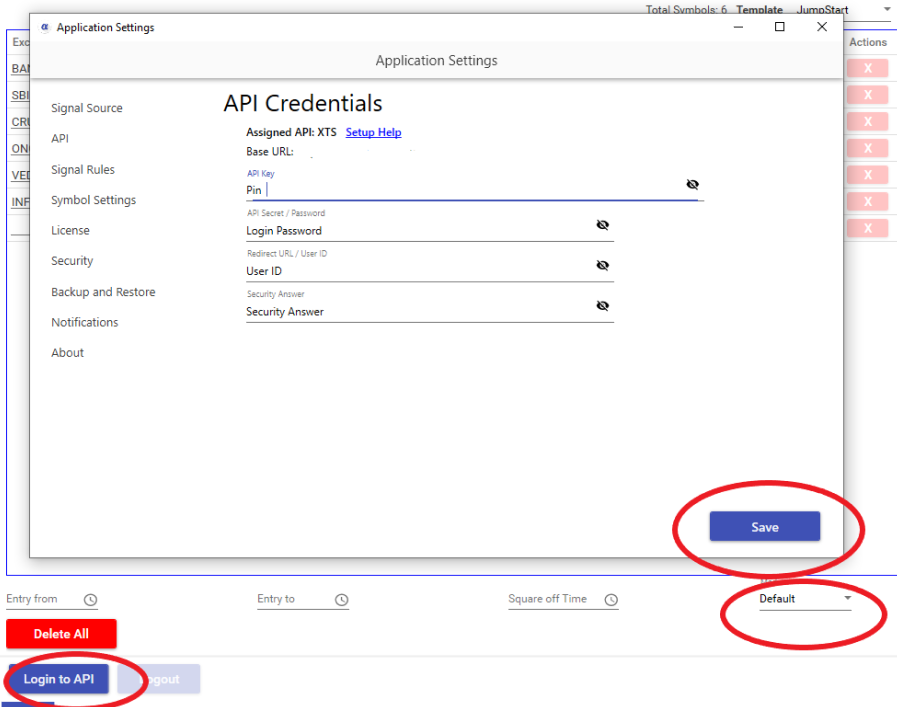
STEP 2: Save application settings. Keep mode Default and Login to API. If Credentials are correct, Bridge will display message – Login successful to API
XTS API Features
| Feature | Details |
| Cost | Depends on Broker |
| Auto Order Cancellation | YES |
| MaxProfit/MaxLoss | YES |
| SLL, SLM Orders | YES |
| CO | NO |
| BO | NO |
| Trail SL in BO | NO |
| MCX Futures | YES |
| NSE Currency | YES |
| NSE Weekly Options | YES |
Recent Discussion