
Step 1: Download and Install Interactive Broker Software, https://www1.interactivebrokers.com/en/index.php?f=16042 and log in to your app.
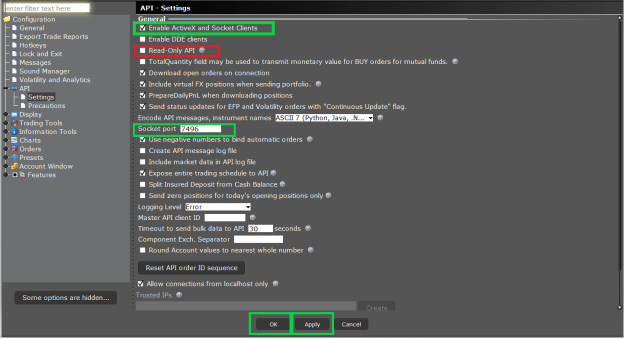
Step 2: Go to File menu -> Global Configuration -> API -> Settings.
Make sure that you have ticked “Enable ActiveX and Socket clients and untick “Read-only API”.
Change Socket Port number to 7496.
Click on Apply and OK.
Step 3: No API setup is required in Application settings in APIBridge.
Step 4: Keep mode Default and Login to API. If the IB settings will be correct, Bridge will display the message – Logged in to Interactive Brokers successfully.
Recent Discussion