
Error 3513 indicates issue with TradeSmart API setup in APIBridge. If you want to trade in other Broker API, contact your admin.
STEP 1: Login to Trade smart Web Portal https://swing.tradesmartonline.in/
STEP 2: Go to Index and click on App Center and click on “Create new App” if you are a first-time user.
STEP 3: Copy and Paste App details in Bridge API credentials as follows:
- API Key: API ID
- API Secret: API Key/ App Secret key
- User ID: Your broker account ID
- User Key: As mentioned in your App details.
Note: User Key appears only the first time in App details when you create new App. Please save it securely on your computer also as it will not appear later.
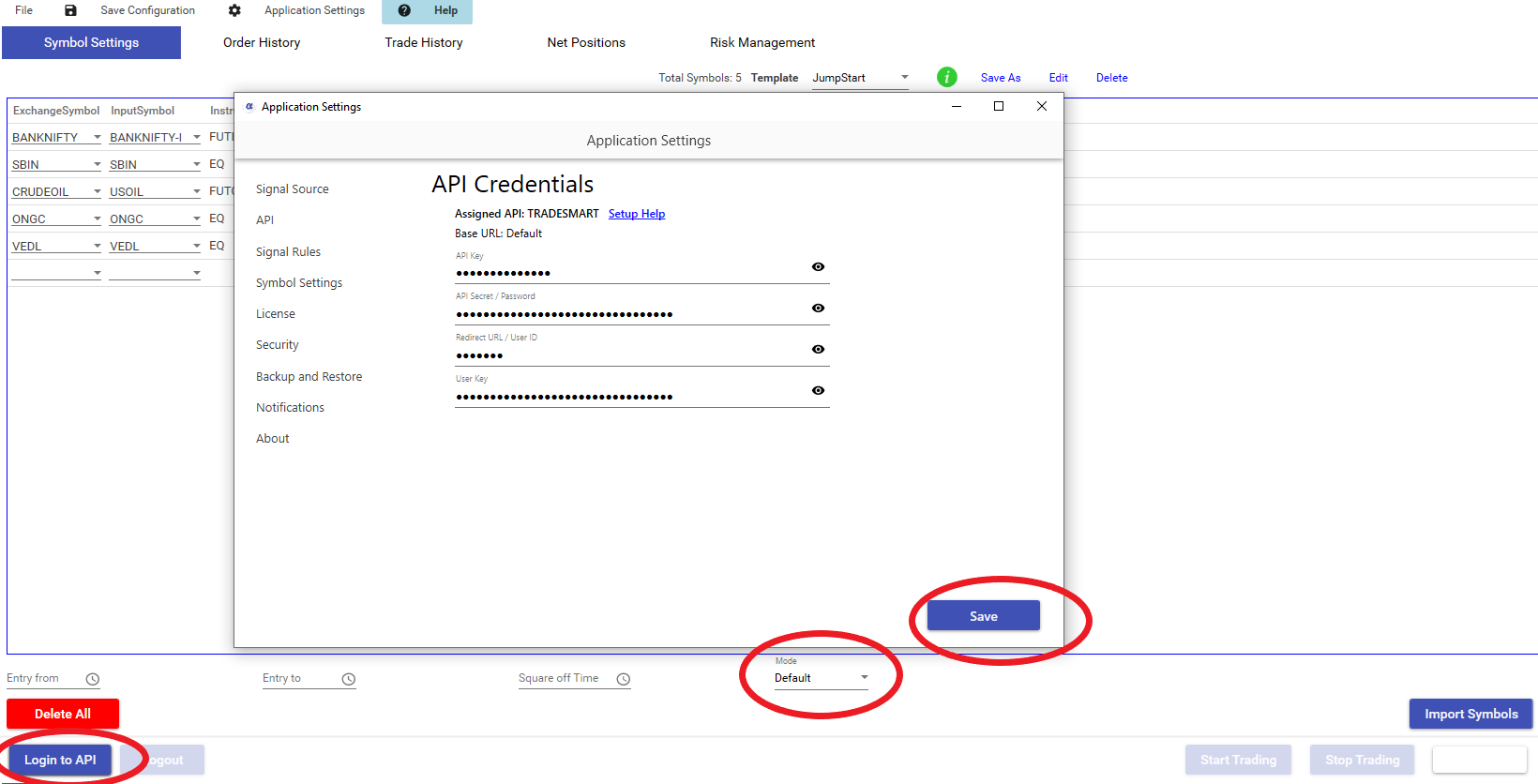
STEP 4: Save application settings. Keep mode Default and Login to API. If Credentials are correct, Bridge will display message – Login successful to API
| Feature | Details |
| Cost | Free |
| Auto Order Cancellation | YES |
| MaxProfit/MaxLoss | NO |
| SLL, SLM Orders | YES |
| CO | YES |
| BO | YES |
| Trail SL in BO | NO |
| MCX Futures | YES |
| NSE Currency | YES |
| NSE Weekly Options | YES |